Proposal Review Panel
The Proposal Review panel is used to select which proposed deal should be included in the campaign for customers with multiple proposed deals. This section displays when the Lead Sheet panel is accessed for a customer who has multiple proposed deals. Using this section, you can view each available proposal and select the proposed deal to add to the campaign.

|
Click a link in the Available Proposals column on the List View tab on the Results panel of the Sales Campaign screen. |
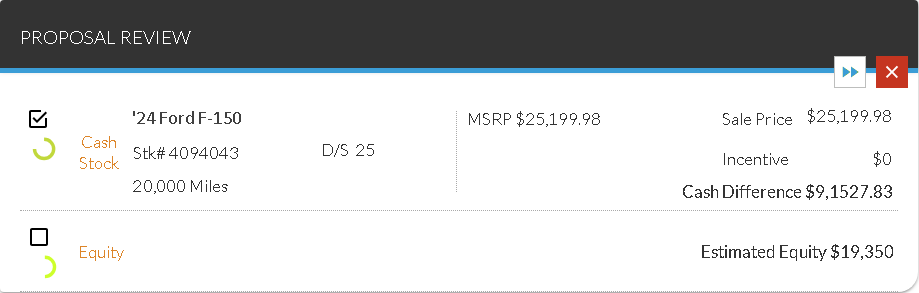
To select a proposed deal, select the check box corresponding to the deal in the Proposal Review panel. Information for the selected deal displays in the Lead Sheet panel. Once a proposal is displayed in the Lead Sheet panel, it can then be added to the sales campaign by clicking the  (Add) icon.
After a proposal has been selected for the customer, the proposal review section can be hidden by clicking the  (Hide) icon. Once the Proposal Review panel has been hidden, it can be displayed using the
  (Show Proposal Review) icon in the Lead Sheet panel.
The following fields display on the Proposal Review panel.
Selected: (Not labeled) Select this check box to display the corresponding proposal in the Lead Sheet panel.
Prediction Indicator: (Not labeled) An icon displays to indicate how likely the corresponding customer is to purchase a vehicle.
The following icons can display.
-
 (Okay)
 -
 (Good)
 -
 (Great)
 -
 (Wow)
(Wow)
Lead Sheet: (Link) (Not labeled) The lead sheet assigned to the customer displays as a link. Click the link to display the Lead Sheet panel for the corresponding proposal. Additionally, click this link to select the unlabeled Selected check box for the corresponding proposal.
The following fields is only available for proposals that include a proposed vehicle.
Vehicle: (Not labeled) The year and model of the customer's proposed vehicle display.
STK#: The stock number of the proposed vehicle displays.
D/S: The number of days the proposed vehicle has been in stock displays.
Mileage: (Not labeled) The mileage of the proposed vehicle displays.
MSRP: The manufacturer suggested retail price (MSRP) for the proposed vehicle displays.
Sale Price: The sale price of the proposed vehicle displays.
Incentive: The incentive amount for the proposed deal displays.
Cash Difference: The difference between the value of the customer's trade-in vehicle and the proposed vehicle displays.
Note - This field is only available for Cash type proposals.
Payment Variance: The difference in monthly payment between the customer's current deal and the proposed deal displays.
Note - This field is only available for Finance or Lease type proposals.
Rate: (Not labeled) The finance rate of the proposed deal displays. For lease deals, the money factor displays.
Note - This field is only available for Finance or Lease type proposals.
Term: The term length, in months, of the proposed deal displays.
Note - This field is only available for Finance or Lease type proposals.
The following fields are only available for proposals that do not include a proposed vehicle.
Estimated Equity: The estimated amount of equity generated by the proposed deal displays.
Note - This field is only available for Equity type proposals.
Market Value: The market value of the customer's current vehicle displays.
Note - This field is only available for Market Value type proposals.
Click here for a list of products that may be mentioned in this help file.